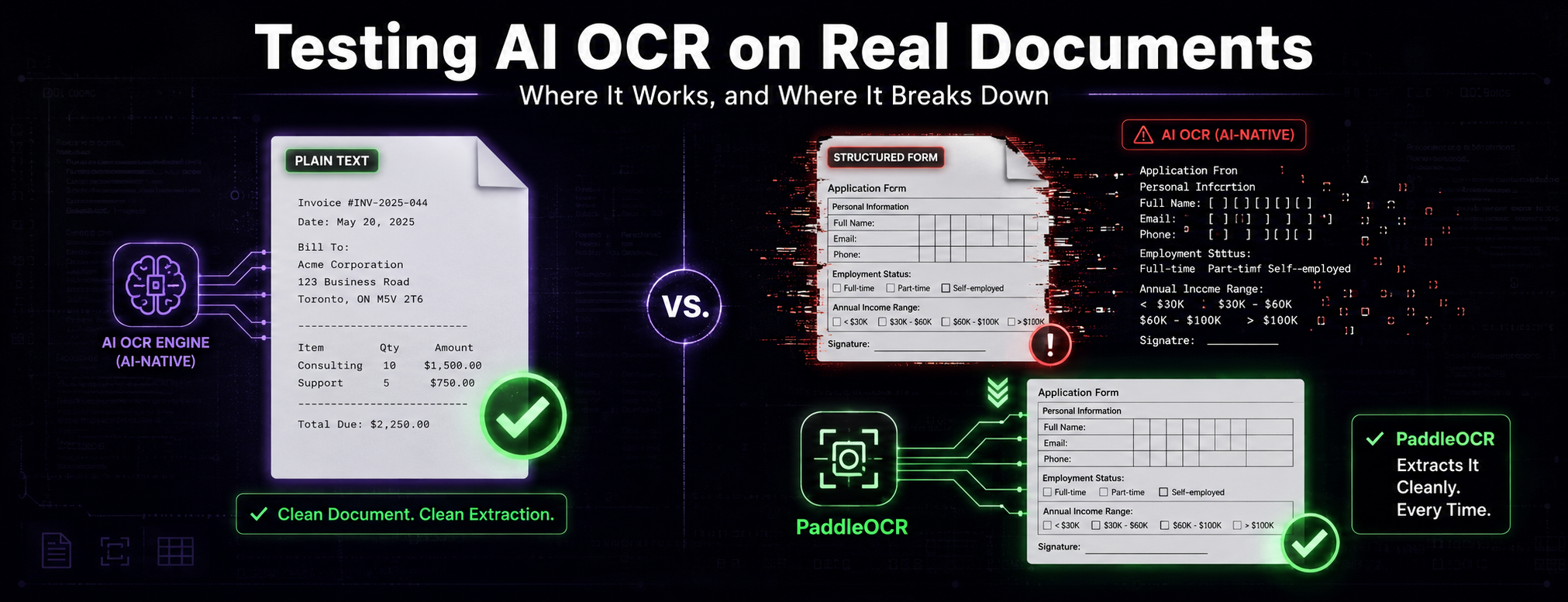
OCR used to be a narrow, mechanical problem: recognize characters, output text. AI-native OCR models have expanded that into something closer to document understanding, reading layout, inferring structure, and producing output that goes beyond a flat text dump. For clean, text-heavy documents, this works remarkably well. The gap emerges on the documents that most enterprise automation actually needs to process: structured forms with tables, checkboxes, and fixed spatial layouts, where the meaning of a piece of text depends entirely on its position on the page.
Testing this gap directly, using Unlimited-OCR against a range of document types from clean text to complex medical claim forms, shows exactly where AI-native document understanding currently holds up and where it still breaks down in ways that matter for real deployment.
Where It Performs Well
On a clean, two-page plain-text PDF, the results were close to flawless. The model extracted content accurately with very few issues, the kind of performance that makes it easy to assume the OCR problem is largely solved. For document types where content flows linearly, meaning does not depend on spatial position, and there is no dense field structure to preserve, AI-native OCR is genuinely strong.
This matters because a lot of the marketing and benchmark conversation around document AI centers on exactly this document type. Clean PDFs are the easy case, and they are where these models are optimized to perform.
Where It Breaks Down
The test that mattered was a CMS-1500 medical claim form, a two-page structured document with tables, checkboxes, field boundaries, and layout-dependent meaning. This is representative of an enormous category of real business documents: insurance forms, tax documents, structured applications, compliance paperwork.
The output quality dropped sharply. Rather than reading the actual field labels, the model degenerated into repetitive token loops, getting stuck cycling through fragments like "MECCA" and "PICA" instead of extracting the patient information, insurance fields, and diagnosis codes the form actually contained. This is not a minor accuracy dip. It is a failure mode where the model loses track of what it is reading entirely.
The Head-to-Head Comparison
To put that failure in context, the same CMS-1500 pages were run through PaddleOCR (PP-OCRv6), a more traditional, layout-aware OCR engine, as a direct comparison.
The difference was stark. Where Unlimited-OCR looped on repeated fragments, PaddleOCR correctly extracted the patient name field, birth date, sex, insured's name, and address fields, all in the right order and correctly separated. On the "Patient's Name / Birth Date / Sex" block specifically, PaddleOCR returned clean, correctly labeled fields. Unlimited-OCR, on the same region, returned generic form boilerplate text unrelated to the actual field content.
This is worth being precise about: this was a single-document, visual comparison rather than a formal benchmark with a scored metric like character error rate. But the structural difference is unambiguous enough that the comparison is meaningful on its own. A layout-aware traditional OCR engine outperformed a newer AI-native model specifically on the task that AI-native models are supposed to be better at: understanding structure, not just recognizing characters.
What Happens at Scale
Testing long-document handling meant scaling the same content to 400 pages. Running the full document at once exceeded the model's context window immediately, which meant batch processing was required just to get output at all.
Processing in 50-page batches worked technically but extraction quality became noticeably less consistent than the original two-page test. Reducing batch size to 2 pages preserved more context and helped somewhat, but the structured form extraction problem persisted regardless of batch size. Smaller batches manage the context window constraint. They do not fix the underlying issue with spatial layout comprehension.
This distinction matters for anyone designing a document pipeline. Batching is a workaround for a context limitation, not a solution to a quality limitation. Teams that assume smaller batches will fix accuracy problems on structured documents are solving the wrong problem.
Why This Gap Matters for Document Automation
The practical implication is that AI-native OCR is not a uniform upgrade over traditional OCR across all document types. It is a significant upgrade for clean text and a step backward for dense, structured, layout-dependent documents, at least in current implementations.
This matters because the documents businesses most need automated are disproportionately the structured kind: claim forms, applications, compliance paperwork, invoices, tax documents. These are exactly the documents where manual processing is most expensive and where automation has the highest return, and they are exactly the documents where the newer generation of AI-native OCR currently underperforms older, purpose-built layout engines.
The right architecture for a production document pipeline is not to assume one OCR approach handles everything. It is to route documents based on their structure: AI-native models for content-heavy, loosely structured text, and layout-aware engines like PaddleOCR for dense, field-based forms where spatial position carries meaning. Building that routing logic, and testing real documents against real failure modes before committing to a single approach, is what separates a document pipeline that works in a demo from one that holds up on the messy, structured paperwork that most businesses actually need processed.